How AI Agents Use SKILL.md, AGENTS.md, and Other Markdown Files
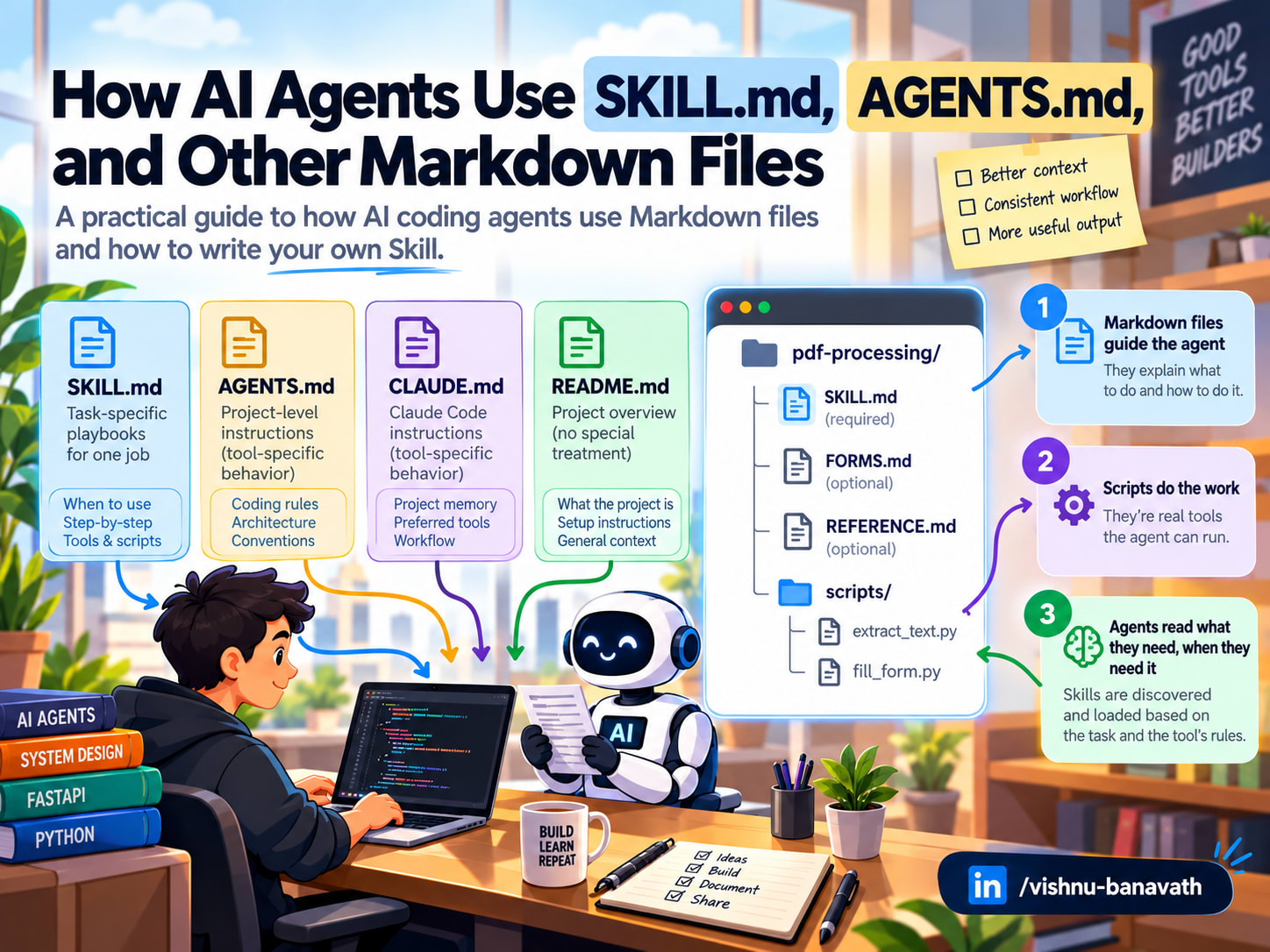
A note before we start: I'm learning these concepts as I write about them. This article is my way of making sense of how AI agents use Skills and instruction files, checked against the official documentation listed at the end. If something here is wrong or out of date, I'd genuinely like to hear about it.
Why a model that can code still needs instructions?
If an LLM can write code, why does it need a Markdown file to teach it how to do its job?
Because knowing how to code isn't the same as knowing how a specific project expects the job to be done.
Think about hiring a senior engineer. They already know Python, FastAPI, and SQL. But on day one they still ask: Where does the code live? Which test command do we run? Do we use Alembic for migrations? Is there a script for this already? Their skill is general. Your project's way of working is specific, and nobody can guess it.
An AI coding agent is in the same position, except it starts every session as a brand-new hire. By default, it has no memory of yesterday unless something hands it that context again. Files like SKILL.md, AGENTS.md, and CLAUDE.md are how we hand it over.
In this article I'll walk through what I've learned so far: what a Skill is and what goes inside one, how an agent decides which instructions to read and when, why a Markdown file can't run code on its own, how SKILL.md differs from AGENTS.md, CLAUDE.md, and README.md, and how to write your own Skill.
1. What is an Agent Skill?
An Agent Skill is a folder that teaches an agent how to do one kind of task well. It holds instructions, optional reference documents, and optional scripts.
Analogy: the new hire's playbooks. Your experienced new hire already knows how to code. What they need are the team's playbooks: one page for "releasing a new version," another for "handling a refund request." Each starts with a line saying when to use it, then gives the steps, links to the details, and sometimes points to a script the team already wrote. Nobody reads every playbook on day one. They open the right one when the job comes up. A Skill is that playbook, written for an AI agent.
Here's what a PDF-processing Skill might look like on disk or in file system:
Only SKILL.md is required. Everything else is optional and its file names are up to you: FORMS.md and REFERENCE.md aren't special names that tools look for, just files this particular Skill chooses to include.
The key division of labor: the Markdown files guide the agent; the scripts do the work. SKILL.md might say "extract the text, check that it isn't empty, then summarize." The script is what actually opens the PDF and pulls the text out.
Where Skills live depends on the platform. In Claude Code, for example, personal Skills go in ~/.claude/skills/ and project Skills go in .claude/skills/ inside your repository, so the whole team shares them through version control.
2. Inside a SKILL.md file
A SKILL.md file has two parts: a short metadata header (called frontmatter, written in YAML between --- lines) and the instructions below it.
The header has two required fields. The name identifies the Skill (lowercase letters, numbers, and hyphens). The description says what the Skill does and when to use it.
The description is the most important line in the file. It's the playbook's title line: in Claude's implementation, the name and description are the only parts of the Skill the agent sees before deciding whether to open it, so they carry much of the weight in that decision, alongside the request itself. Some tools, including Claude Code, also let you invoke a Skill directly by name. Compare these two:
A Skill with a vague description may never be used, however good its instructions are.
Notice also how the body points to FORMS.md and REFERENCE.md instead of copying their contents. That's deliberate, and it's the subject of the next section.
3. Does the agent load every file at once?
No. Anthropic describes its Skills design with a concept called progressive disclosure: information is made available in stages, only as the task needs it.
Skills are stored as ordinary folders on a filesystem the agent can access, rather than being pasted into the prompt. This filesystem-based architecture allows progressive disclosure: the agent can see which Skills exist without reading them, open a SKILL.md only when it needs it, and run a script without loading its code.
Skills and the context window
Skills stay on the filesystem. Each part moves into the context window only when it is needed.
To see why this matters, you need one idea: the context window. An LLM can only consider the text currently in front of it, its working memory for the conversation. That space is limited, and filling it with irrelevant instructions costs time and money and can distract the model from what matters.
Analogy: the new hire and the team wiki. On day one, your new hire doesn't read the entire wiki. They skim the index of page titles so they know what exists. When a task comes up, they open the one relevant page, and they follow its links to the deep-dive docs only if the task calls for it.
Anthropic documents three levels for Claude's Skills. Other platforms that support Skills follow the same general idea but may load things differently, so treat the table as Claude's behavior:
| Level | What's loaded | When | New-hire equivalent |
|---|---|---|---|
| 1. Metadata | Each Skill's name and description | Always, from the start | Skimming the wiki's index of titles |
| 2. Instructions | The body of SKILL.md | When a task matches a Skill | Opening the relevant page |
| 3. Resources | Other files and scripts in the folder | Only if the instructions call for them | Following a link to the deep-dive doc |
Only what the task needs enters the context window
Each column is the context window at that moment. Highlighted = added at that step.
SKILL.md body arrives when a task matches, a script adds only its output, and supporting files stay on disk unless the instructions call for them.Here's how that plays out for a request like "Summarize this contract PDF":
Notice the last two steps. When the agent runs a bundled script, the script's source code doesn't need to be loaded into context, only its result. The agent also doesn't need to rewrite that logic from scratch each time. Large outputs still take up space, though, so a good script returns only what the agent needs.
The practical upshot: you can install many Skills, each with extensive documentation, without loading all of it into the model's context upfront. The exact mechanism varies by platform, but the principle is simple: provide the right information at the right time.
What happens over several requests?
Progressive disclosure decides what enters the context window. Here's what happens to it as one conversation continues through three requests.
Within one conversation, loaded Skills stay in context
One conversation, three requests. Highlighted = loaded during that turn.
CLAUDE.md, and the Skill descriptions), without the Skill content loaded in the previous one.4. Can a Markdown file execute code?
No. Markdown is a document format, not an execution environment.
Analogy: the new hire without a laptop. Your new hire may know the deploy procedure by heart. But on their first morning, before IT has handed over a laptop, repository access, and production permissions, they can't deploy anything. Knowing the steps and being able to carry them out are two different things.
In an AI agent, the parts map like this: the new hire is the LLM, which reads the instructions and decides each step; the playbook is SKILL.md and other instructions; the workstation and access are the runtime, which actually runs commands, reads files, and executes scripts; and the tools on that workstation are what the runtime exposes, like a shell, a Python interpreter, a file editor, or a web browser.
So when SKILL.md contains this line:
nothing happens on its own. The model has to ask the runtime to run it. Under the hood, an agent is a loop. Here's a simplified version in Python-style pseudocode (real frameworks differ in the details, but the shape is the same):
The model only requests actions; the runtime carries them out
Follow the numbers: the loop repeats until the model gives its final answer.
The model never touches the file system directly. It only produces text, and some of that text is a structured request (a tool call) that the runtime knows how to carry out. Even "reading SKILL.md" in Level 2 is usually just a tool call to read a file.
This has a practical consequence: a Skill can't create capabilities the environment doesn't have. If the Skill says "use pdfplumber" but the environment has no Python, no pdfplumber installed, or no permission to run commands, the instruction can't be followed. That's why the same Skill can work perfectly in one product and fail in another: the playbook is identical, but the access differs.
One nuance: some platforms let a Skill's header adjust permissions. In Claude Code, an optional allowed-tools field lets the agent use the listed tools without asking each time while that Skill is active. Even then, it's the runtime choosing to honor that field, within limits the user controls, and it can't add a tool that doesn't exist.
5. What about AGENTS.md, CLAUDE.md, and README.md?
These are all Markdown files, but they serve different readers and are loaded in different ways.
Analogy: what the new hire reads, and when. README.md is the product overview the new hire might skim to understand what the team builds. AGENTS.md and CLAUDE.md are the team's working agreements: project-wide rules the new hire gets up front, though exactly when an agent loads them depends on the tool. A Skill is a playbook for one specific job, opened only when that job comes up.
| File | Written for | When it's read | Typical contents |
|---|---|---|---|
README.md | Humans | When someone (or an agent) chooses to open it | What the project is, how to install and run it |
AGENTS.md | Coding agents that support the format | Usually loaded automatically by agents that support it; exact rules vary by tool | Build and test commands, code style, project rules |
CLAUDE.md | Claude Code | Project-level file loaded automatically at the start of a Claude Code session | Same kind of content as AGENTS.md, for Claude Code specifically |
SKILL.md | Agents that support Skills | Description always; body only when a matching task comes up | A procedure for one specific kind of task |
The big difference is always-on vs. on-demand. In the tools that support them, AGENTS.md and CLAUDE.md are typically read at the start of a session, so they should hold rules that apply to almost every task. Some tools also pick up additional copies in subdirectories, loading them only when the agent works in that part of the repository. A Skill's body is read only when relevant, so it can hold detailed procedures that would be wasteful to load every time.
Project rules load up front; Skill details wait for a matching task
Typical behavior; exact loading rules vary by tool.
README.md gets no special treatment.Here's what an AGENTS.md might look like:
A CLAUDE.md would look much the same. If your team uses several coding agents, a common approach is to keep the shared rules in AGENTS.md and have CLAUDE.md point to it, so the rules live in one place.
And README.md? Most agents don't load it automatically. An agent may still open it like any other file if it decides the information is useful, but it gets no special treatment.
The key takeaway: a file doesn't influence the model just because it exists in your repository. Something has to put its contents in front of the model, either the agent framework loading it automatically or the agent deciding to read it. Which file names get special treatment depends entirely on the tool you're using.
6. Building your own Skill: a FastAPI example
Say your team builds FastAPI services and you're tired of telling the agent the same things every time: where routers go, how to structure database code, how to write migrations, which tests to run. Let's package that into a Skill.
The SKILL.md holds the procedure:
The template gives the agent a starting point that already matches your style:
The capitalized placeholders (RESOURCE, RESOURCE_MODEL, and so on) must be replaced with your project's real models and schemas before the code can run. That's exactly what step 1 of the Skill tells the agent to do.
And the script turns "make sure it's correct" into a check that gives the same answer every time:
This assumes the project already has Ruff, mypy, and pytest configured. Adapt the commands to your own repository.
Notice how each piece does a different job. The description gets the Skill picked for the right requests. The SKILL.md body gives the order of operations. CONVENTIONS.md holds details the agent reads only when it reaches the model step. The template removes guesswork about style. The script replaces "I think the tests pass" with evidence that both the agent and you can inspect.
Now "Add a /invoices endpoint" produces code that looks like your team wrote it, without you pasting the same instructions into every prompt.
7. Writing good Skills, and using them safely
A few habits separate Skills that get used from Skills that sit ignored:
- Write the description for the agent's decision. Say what the Skill does and the phrases or situations that should trigger it. If it never fires, the description is the first thing to fix.
- Keep SKILL.md focused. Put the procedure in the main file and move long reference material into separate files it links to. Remember: everything in the body is loaded whenever the Skill is used.
- Script the parts that must not vary. Validation, file conversion, and formatting checks belong in scripts. Leave judgment calls to the model.
- Include a way to check the result. A test command or validation script lets the agent confirm its work instead of assuming it.
- Test it on real requests. Ask for tasks the Skill should handle and a few it shouldn't, and watch whether it triggers correctly.
Skills don't guarantee perfect results. The model, the instructions, the available tools, and the runtime all shape the outcome. A Skill raises the odds of getting it right; it doesn't remove the need to review the output.
A word on security. A Skill can contain scripts that run in your environment, and instructions that steer what the agent does. Treat a Skill from the internet the way you'd treat any dependency or shell script you download: only install it from sources you trust, and read through it first, including the scripts. A malicious or untrusted Skill could contain unsafe instructions or scripts, so review its contents, and any permissions it requests, before using it.
The bigger picture
An AI agent isn't just a model. It's a system of parts that work together, and each part maps onto our new hire:
| Part | Role | New-hire equivalent |
|---|---|---|
| LLM | Reasons and decides the next step | The experienced new hire |
AGENTS.md, CLAUDE.md | Project-wide rules | The team's working agreements |
| Skills | On-demand procedures for specific tasks | Playbooks for specific jobs |
| Tools | Actions the model can request | The tools on their workstation |
| Runtime | Executes permitted actions and returns results | The laptop and access that let them act |
The key takeaway: instructions guide the model; the surrounding system makes the actions possible. A Markdown file never runs anything, installs a package, or creates a tool. It tells a capable model how to use the capabilities that are actually there.
Seeing it this way is what made it click for me. SKILL.md, AGENTS.md, and the rest stopped looking like magic files and started looking like what they are: well-organized documentation, delivered to the right reader at the right moment.
Next, I'm learning how agents connect to external services and tools through the Model Context Protocol (MCP), and I'll write up what I find.
Comments 0
No comments yet — start the conversation.