Harness Engineering Explained: What I Learned About Building Reliable AI Agents
Introduction
Imagine hiring the world's best chef, giving them a kitchen, and expecting them to run an entire restaurant.
Sounds simple, right? But there's a problem.
The chef knows how to cook. But who writes the recipes? Who manages the inventory? Who takes the orders? Who makes sure they don't serve something they aren't authorized to prepare? And what happens when an order is interrupted halfway through?
A great chef alone can't run a restaurant. And a great LLM alone can't run a business.
I've been learning about this gap recently, and it led me to a concept called harness engineering. I'm not writing this as an expert. I'm writing it as a fellow learner, sharing what I've understood so far, the analogy that made it click for me, and a small harness I built to test my understanding. If you're learning this too, I hope it saves you some time.
Key takeaways (what I've learned so far)
- Harness engineering is the design of the backend, or environment, around an LLM that lets it carry out real tasks reliably in production.
- AI Agent = Model + Harness. The model provides the intelligence; the harness provides context, tools, rules, and memory.
- Every production harness rests on four pillars: context, actions, boundaries, and persistence.
- A model in a well-built harness can outperform a more powerful frontier model in a generic one, so improving the harness is often the fastest way to make an AI agent more accurate and reliable.
What Is Harness Engineering?
Here's the definition that made the most sense to me:
Harness engineering is the design of the backend, or the environment, we provide to an LLM so that it can carry out real tasks reliably in production.
On its own, an LLM can only read text and decide what to say or do next. It can't look up your customer records, doesn't know your processes, has no idea what it's allowed to touch, and forgets everything when a session ends. The harness is the software layer that fills those gaps. It decides what the model sees, which tools it can use, what it may do, and how its work is saved.
AI Agent = Model + Harness
What surprised me most was realizing I'd already been using harnesses without knowing it. ChatGPT, Claude Code, and Codex all wrap a model in software that connects it to tools, files, and the rest of the application.
The Chef Analogy: How an AI Harness Works
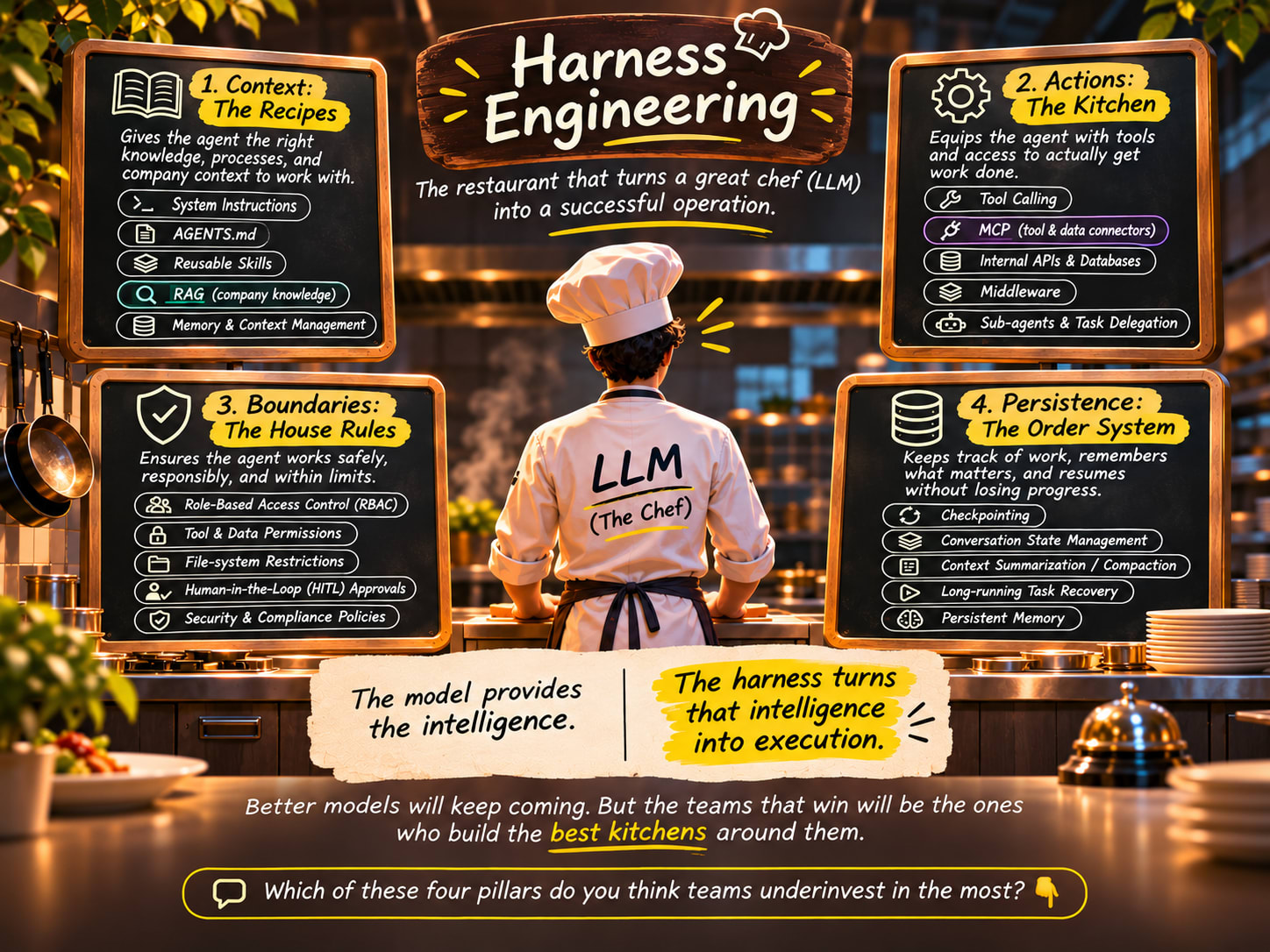
The analogy that finally made it click for me was a restaurant. Think of the LLM as the chef and the harness as the restaurant built around it. Each part of a restaurant has a direct counterpart in an AI agent:
Each row below the chef is one pillar of the harness, covered in detail later in this guide.
Why Do AI Agents Need a Harness?
When I started digging in, I found that an LLM on its own has five limits, and each one is a common reason AI agents fail in production:
- No business knowledge. Your policies, customers, and processes aren't in its training data.
- No way to act. Without tools, it can describe an action but never perform it.
- No sense of authority. It doesn't know who is asking or what they're allowed to do.
- No memory. Each session starts from zero, and long tasks overflow the context window.
- A habit of guessing. When information is missing, it produces the most plausible answer, not the true one.
These limits matter more as AI moves from chatbots to agents. Prompt engineering asked what should I say to the model? Context engineering asked what should the model see? Harness engineering asks what system should the model work inside? That shift happened because agents now run many steps, call real systems, and work for minutes or hours at a time.
How a Harness Improves AI Agent Accuracy
This was the part that changed how I think about AI agents. Most agent errors don't come from a model being "not smart enough." They come from missing information, the wrong tools, or no way to check the work. A harness fixes those conditions:
- Grounding replaces guessing. Retrieved policies and records mean the model answers from facts.
- Real data replaces memory. Tool calls return true prices and dates instead of estimates.
- Focused context cuts noise. Loading only what each step needs keeps the model's attention where it matters.
- Verification catches errors. Reviewer sub-agents, tests, validation, and human approval check the work before it ships.
- Guardrails block the worst mistakes. Limits enforced in code can't be talked around.
The same model, given the same request, produces a very different result depending on its harness:
Without a harness, the model answers blind. With one, it decides from the real policy and the real order, and the result is checked before it reaches the customer.
A Better Harness Can Beat a Bigger Model
The finding that surprised me most while researching this: a model in a well-built harness can deliver better results than a more powerful frontier model in a generic one. Upgrading the harness is often a bigger lever than upgrading the model.
- Same model, very different scores. On the ARC-AGI-3 benchmark, OpenAI's GPT-6 Astra scored 62.7% in ARC Prize's standard harness but 98.6% inside OpenAI's own harness, and the better run also cost less (The New Stack).
- Harness changes outweigh model upgrades. A 2026 research paper reports that changing only the harness raised the same model's Terminal-Bench 2 score from 69.7% to 77.0%, and that harness-only differences on SWE-bench Verified reach up to 15 percentage points. That's often more than the gap between competing frontier models (arXiv).
- Cheaper models can win. In a security test by Hacktron, open-weight models like DeepSeek V4 and GLM 5.2, running inside a purpose-built harness, found more of the target vulnerabilities than GPT 5.5 in Codex and Opus 4.8 (Hacktron).
One honest caveat I learned along the way: a harness can't create ability the model doesn't have. In the same Hacktron test, frontier models still found the most critical bugs that smaller models missed. The way I think about it now: the model sets the ceiling, and the harness decides how close you get to it.
The 4 Pillars of Harness Engineering
Every production harness is built from four pillars. Context tells the model what to do, actions let it do it, boundaries limit what it may do, and persistence lets it finish what it started.
1. Context: The Recipes
No chef cooks without knowing the menu and the house standards. Context gives an agent the same grounding: who it works for, what it's trying to achieve, and how things are done.
- System instructions: the agent's role, goals, and standing rules.
- AGENTS.md or CLAUDE.md files: project conventions the agent reads at the start of every session.
- Skills: packaged instructions for specific tasks, loaded only when needed.
- RAG (Retrieval-Augmented Generation): fetching current documents and records at the moment they're needed.
Tip: less is more. Load only what the current step needs, and explain the why behind rules; agents generalize better from reasons than from long lists of prohibitions.
2. Actions: The Kitchen
A chef with no stove can only describe food. Tools turn an agent from an advisor into a worker.
- Tool calling: structured actions, such as
lookup_order(order_id), that the harness executes. - MCP (Model Context Protocol): an open standard for plugging agents into external systems.
- Internal APIs and databases: where orders, customers, and tickets actually live.
- Middleware: code around each call that validates, logs, retries, or limits it.
- Sub-agents: specialists with their own context, like a sous-chef handling desserts.
Tip: design tools for the model. Use clear names and plain descriptions, prefer a few strong tools over many overlapping ones, and return errors that explain how to recover.
3. Boundaries: The House Rules
You wouldn't let a chef approve refunds or change prices. Agents act fast, at scale, and can be misled by what they read, so they need limits too.
- Role-based access control (RBAC): each role gets only the tools and data it needs.
- Scoped access and sandboxing: read-only connections, restricted folders, and isolated environments.
- Human-in-the-loop approvals: a person approves high-impact or irreversible actions.
- Audit logs: a record of every tool call and decision.
Tip: enforce rules in code, not prompts. "Never refund over $500" in a prompt is a request; a check inside the refund tool is a guarantee. Treat emails, web pages, and files as untrusted input that may contain prompt injection.
4. Persistence: The Order System
If the power cuts out mid-service, a good restaurant picks up where it left off. Long agent tasks need the same resilience against crashes, timeouts, and approval waits.
- Checkpointing: saving state after each step so a run can resume.
- State management: tracking what's done, decided, and still pending.
- Context summarization: compressing older history to stay within the context window.
- Persistent memory: facts and preferences that carry across sessions.
Tip: make actions idempotent, so a resumed task never charges a customer twice. Checkpoints also make human approval practical: the agent can wait hours and resume exactly where it stopped.
The Complete AI Agent Harness Architecture
To make sense of it all, I tried to put the four pillars into one picture. This is how I understand a production system: follow a single request from the user, through the harness, to your company systems and back.
- Gateway: the request arrives, and the harness identifies the user, their role, and their session.
- Context: the harness assembles what the model needs: the system prompt, AGENTS.md, relevant skills, retrieved documents, and memory.
- Agent loop: the LLM decides the next step, writes a plan, and middleware keeps the loop within limits.
- Boundaries: every tool call is checked against the user's role. Risky actions pause for a human approver, and everything is logged.
- Actions: allowed calls run through tools, MCP servers, APIs, or sub-agents against company systems, and the results flow back into the loop.
- Persistence: state is checkpointed after every step, so the task can pause, resume, or recover. When the work is done, the response returns through the gateway.
Real-World Example: The Harness Around Claude Code
The real-world example that helped me most was Claude Code, Anthropic's coding agent. It's one of the clearest real-world harnesses I've found. Its documentation puts it directly: "Claude Code is the harness; Claude is the model inside it." The same Claude model is available to any developer through an API. Claude Code is what turns it into a coding agent.
| Pillar | How Claude Code implements it |
|---|---|
| Context | CLAUDE.md project instructions loaded every session, skills loaded when relevant, and auto memory of your preferences |
| Actions | Tools to read files, edit code, and run shell commands; MCP servers; subagents with their own context; hooks at fixed points in the loop |
| Boundaries | Permission modes, including a plan mode that proposes changes before editing; allow, ask, and deny rules; OS-level sandboxing |
| Persistence | Resumable sessions, checkpoints at every prompt with /rewind, and compaction when the context window fills |
Tracing one request: "The login test is failing. Fix it."
- Context:
CLAUDE.mdalready tells Claude how this project runs its tests. - Actions: Claude reads the test, searches the code, and runs the suite to reproduce the error.
- Boundaries: permission rules decide whether each edit or command can run, needs approval, or is blocked.
- Persistence: every edit is checkpointed, so a bad fix can be rewound.
Source: Claude Code glossary.
Hands-On: Build an AI Agent Harness with LangGraph Deep Agents
Reading about harnesses only took me so far, so I followed a video tutorial (credit: [add the video title and link here]) and built a small one myself. Let's build it together: NS Work, an internal assistant for a fictional analytics company, Northstar, used by sales, engineering, and finance. We'll add one pillar per version using Deep Agents, LangChain's open-source agent library, which returns a standard LangGraph graph.
The snippets are simplified. Parameter names can change between releases, so check the current Deep Agents docs before building.
Version 0: Just a model
We start with a model and nothing else.
Ask it "What do you know about Northstar?" and it honestly replies that it has no information about our company. A brilliant chef in an empty building.
Version 1: Add context
First, we teach the harness about Northstar. An AGENTS.md file holds what should always be known: what the company does and working conventions such as "keep answers concise" and "cite record IDs." It loads on every conversation, much like a system prompt, so keep it short.
Next, we add skills for repeatable processes. A company-wide write-proposal skill defines the sections every proposal needs (scope, assumptions, pricing). A team-level triage-issue skill describes how engineering investigates bugs. The agent loads a skill only when the task calls for it.
Now "Use our proposal skill to draft a proposal for Acme" produces a proposal in Northstar's format. But there's still friction: the user has to paste in who Acme is, even though that information already lives in the company's systems.
Version 2: Add actions
We give the harness tools that wrap existing company systems: lookup_customer, lookup_issue, get_revenue, and send_proposal. Each tool has a clear, plain-language description so the model knows when to use it.
We also add middleware (a model-call limit to stop runaway loops) and a sub-agent, proposal-reviewer, which checks drafts against customer records with its own prompt and a narrower tool set.
Now "Draft a proposal for Acme and review it" triggers the whole chain: the agent loads the proposal skill, looks Acme up in the database, writes a plan, drafts the proposal, and hands it to the reviewer. Deep Agents also ships planning and to-do tools by default, so you often get that behavior without extra setup.
Version 3: Add boundaries
The harness can now act, so we need to control what it may do. We handle this in two ways.
Permissions. Each role sees only the tools it needs. Sales gets customer and proposal tools, engineering gets issue data, and finance gets revenue. An engineer's harness simply never has get_revenue. We also restrict the file system so users can't overwrite the company/ and skills/ folders; those belong to the harness developers.
Approvals. Sending a proposal to a customer can't be undone, so it pauses for a human. Approvals need a checkpointer, because the agent must save its state while it waits.
Testing it shows the boundaries working. Asked to send the proposal to an email address that doesn't match the customer record, the agent flags the address as unverified rather than sending. Asked "What was our revenue this year?" from an engineering profile, it reports that it has no access. The same question from a finance profile is answered right away.
Version 4: Add persistence
Finally, we make work survive between sessions, so an employee can start a long task today and pick it up tomorrow.
We add a writable workspace (a sandbox in production), a SQLite checkpointer that saves each conversation under a thread ID, and summarization that compresses history past 12,000 tokens while keeping the last six messages.
The final version of NS Work lists past tasks, resumes any of them with full history, and keeps working within its context limits.
What we built
| Version | Pillar added | What changed |
|---|---|---|
| 0 | None | A capable model that knows nothing about Northstar |
| 1 | Context | Knows the company and follows its processes via AGENTS.md and skills |
| 2 | Actions | Looks up real data, plans its work, and delegates review to a sub-agent |
| 3 | Boundaries | Tools scoped by role, protected files, human approval before sending |
| 4 | Persistence | Resumes tasks across sessions and manages long contexts |
This was my biggest takeaway from building it: the model never changed. Every improvement came from the harness. From here, you could add personal memory per employee, smarter compaction, or scheduled tasks, and each would still fit into one of the four pillars.
Common Harness Engineering Mistakes
From what I've read and tried so far, these are the mistakes that come up most often:
- Blaming the model first. Most failures trace back to a vague instruction, a confusing tool, or missing data. Read the agent's traces before swapping models.
- Enforcing safety only in prompts. Prompts guide behavior; code enforces it.
- Exposing too many tools. Every extra tool makes selection harder and wastes context. Curate.
- Ignoring failure paths. Production is full of timeouts and interrupted runs. Design for resumption from day one.
- Skipping evaluation. Run a set of realistic test tasks on every change, just like code tests.
- Approval fatigue. Ask for human sign-off only on costly or irreversible actions, or reviewers start rubber-stamping.
Harness Engineering Checklist
Here's the checklist I'm using as I keep learning. Before putting an AI agent into production, check that you have:
- Context: clear system instructions, versioned AGENTS.md or skill files, and retrieval for data that changes
- Actions: a small set of well-named tools with plain descriptions and helpful error messages
- Boundaries: least-privilege permissions, hard limits in code, human approval for irreversible actions, and full logging
- Persistence: checkpoints after each step, idempotent actions, and a summarization or memory strategy
- Evaluation: realistic test tasks run on every change
Frequently Asked Questions
What is harness engineering in AI?
Harness engineering is the design of the backend, or environment, around a large language model (LLM) that lets it carry out real tasks reliably in production. It covers the context the model sees, the tools it can use, the rules it must follow, and how its work is saved.
What is the difference between prompt engineering and harness engineering?
Prompt engineering focuses on the words sent to a model. Harness engineering designs the whole system around the model: context, tools, permissions, state, and recovery. A prompt is one small part of a harness.
What are the main components of an AI agent harness?
The four pillars are context (instructions, skills, RAG), actions (tools, MCP, APIs, sub-agents), boundaries (permissions, sandboxing, human approval), and persistence (checkpoints, state, summarization, memory).
Does a better harness make an AI agent more accurate?
Yes. Many agent errors come from missing information, unclear tools, or no way to verify the work. A harness grounds the model in real data and checks its output, so the same model often performs far better, and a smaller model in a strong harness can even outperform a frontier model in a weak one.
Which frameworks help with harness engineering?
LangGraph and its Deep Agents library, Anthropic's Claude Agent SDK, and the Model Context Protocol (MCP) for tool integrations are common starting points.
Conclusion
A world-class chef in an empty building is still just a talented person in an empty room. What makes a great restaurant is the system around the talent.
AI is reaching the same point. The model provides the intelligence; the harness turns it into reliable execution. Better models will keep arriving, and every team will have access to them. My guess is that the lasting advantage will belong to the teams that build the best harnesses around them.
I'm still early in my own learning, so I'd love to hear from you. Which of the four pillars do you find hardest to get right? And if I've misunderstood something here, please tell me in the comments. Let's learn this together.
Comments 0
No comments yet — start the conversation.